TrackPlanning.com
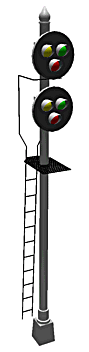
NY Signal drawn
with 3rd PlanIt
by Walter Griffin

The future of 3rd PlanIt track planning tools...

Beta Version
Thanks for your continued interest!
Please use precaution with your files when running beta test software. Save them under a new name when loading a new release, especially if the file format has changed. Save your work frequently during a session in case you encounter a problem in the beta test software.
If you wish to run beta test software, you must install it so that it replaces your currently installed version or you could experience problems. You can revert to your existing version by re-installing it over the beta test version. Do not have more than one copy of 3rdPlanIt.exe on your disk at the same time.
You can report problems to "3pibeta at TrackPlanning dot com" (entered in the proper form). Please include a sample file that demonstrates the problem, if possible.
Download 3rd PlanIt Beta 7.11.156 27 Sep 04 (2.5 Mb)
7.11.156 Turn off lighting when drawing Points or single-vertex Polygons. Provide Ctrl+Shift+Enter hotkey for Group Editor (Edit / Change / Change Selected Colors). Provide "Done" button in the Group Editor dialog to save changes. Provide "Esc" button in the Group Editor dialog to discard changes. Correct operation of Group Dialog controls "Show complete object" and "Show only object". Prevent crash when closing program using [X] in Title Bar while in the Group Editor. Allow trains to follow 100% grade up to 300 mph. Corrected problem importing DXF files that resulted in one extra vertex per triangle. Improved appearance of Light added to drawing when none is present. Combined thickness of 3D Solid extrusion with choice of Smooth Shading to remove second dialog box; thickness and smooth shading settings are retained between extrusions. After changing between the six 2D views, the drawing is now sorted along the view axis, but not Group objects themselves, as their object order could be chosen. Fixed memory leak and in Drill-Down editing. Cleaned up presentation of green highlighted objects when activating and deactivating 3rd PlanIt windows or changing applications. Response to pressing Cancel during subgrouping and harmonizing made reliable. Refined sorting of objects that use Alpha to prevent "cracked window" appearance of items such as spheres. Fixed crash from clicking in 3D view when grouped objects with Alpha are in use. Prevent misalignment of borders of Polygons and Meshes from their fill color. Improved speed of sorting objects and the drawing along the viewing axis. You can now paste to a particular location on the screen. Point to the desired location with the Select Tool or Draw Tool and click the Left Mouse Button. For 30 seconds thereafter, when you paste an object, it will be centered on the location. Each time you paste an object, the 30 second time period is restarted. Improvements to Change / Subgroup and the Harmonizer, now moved to Ctrl+Alt+G for "Geometric Harmonizer". There is also a Targeted Harmonizer on Ctrl+Alt+T. Both of these use subgrouping present in the object to focus their activities. If you hold the Shift key down simultaneously, the whole object is used without regard to subgrouping.
7.11.155 Sort wood groups along viewing axis after creating them.
Enable back face culling for wood groups. After changing between the six 2D views, the drawing is now sorted along the view axis.
Prevent crash from using Shift+DblClick to begin Freehand Rotation of an object, then hitting Esc without moving the mouse. Moved
Freehand Rotation from Shift+DblClick to Alt+DblClick to allow for a new feature.
You can now drill-down edit to a specific subgroup within a Group. Hold the Shift key while double-clicking the desired subgroup. You
can similarly terminate a drill-down edit by holding the Shift key while double-clicking on nothing. Finally, you can abort all changes
made during a drill-down edit by holding the Shift key while pressing the Esc key.
There was a problem with the existing commands Shift+Double-click To Rotate and Double-click To
Drill-Down Edit. They improperly marked the document as modified if you used the Esc key to abort the command.
A similar problem existed when pressing the "Open" button while in a Group Properties Sheet. These problems have been corrected.
Fixed memory leaks: 1) when performing "File / Revert to Saved" while rotating an object or drill-down editing, and 2) when pressing "Open"
while in a Group Properties Sheet.
Changed Flyover mode. Now, the location at which you first press a Flyover Navigation button is considered the center of the control
range. This prevents the Flyover view from moving if you happen to press a mouse button when the cursor is not centered in the view.
This is a "temporary center", which is reset each time you release the Flyover navigation
button(s) and start a new Flyover.
7.11.154 Refine train running routines for layouts with tight helices, and/or very long trains. Allow rolling stock to rotate on turntables. Note: upon returning to 2D after using a turntable, the turntable will not be in the same position as it was in 3D. This will be corrected in a subsequent release. Improve display of long spirals. Ensure roadbed is erased when moving or editing track in 2D. Ensure spirals are fully erased regardless of initial azimuth.
7.11.153 Allow rolling stock to negatiate misalignment typically found in turntable rotation track.
7.11.152 Show 3D length of spirals and circles in Object Data Window. When connecting two Contour Lines that are both black, use the current default colors for Polygons. Stop track jumping in turntables with smaller clearances to the driving track. Save new tunnel opening height in Tunnel Properties dialog. Scale height of tunnel opening to model scale when creating new tunnel opening.
7.11.151 Prevent loco from choosing curved track when entering or leaving turntables.
7.11.150 Generate normals for line segments orthoganol to the line, rather than using the "Up" normal. Prevent problems when right-clicking near an object but not on the object. Preserve Smooth Shading when using Undo and Redo in 3D. Remove need to hit Ctrl+Z twice to undo a Harmonize command.
7.11.149 Correct polygon count for ties. Polygon count includes one polygon for each tie line, if display is set up for "Ties as Lines". Count includes 5 polygons for each tie in "Full Detail" mode. In both cases, Number Of Polygons minues Number Of Ties is equal to the number of polygons from other sources, such as Meshes and Polygons themselves, alone or in Groups. Allow counts of ties and polygons to be copied from Diagnostics Dialog.
7.11.148 Minimize changes to OpenGL Polygon Culling and Offset states.
7.11.147 Correct "Make 3D Solid" for 2-point Contour Lines and Polylines. Make Harmonizer work with Auto-Tessellation. Correct problem drawing freehand Meshes introduced in .146. Allow Polygons with up to 1024 vertices, using Auto-Tessellation to make them compatible with OpenGL. Update view after rolling mouse wheel in 3D Flyover mode. Allow only one Undo or Redo per command when in 3D mode.
7.11.146 Remove changes in .143 and .144, retaining changes in .145. Prevent Group Edit Box from extending too far from small object segments. Enable auto-tessellation. Identify face-up vs. face-down even for complex and concave Polygons. Allow flipping of any Polygon.
7.11.145 Correct "Mesh / Align Plants to Mesh" for drawings that contain retaining walls or other vertical Mesh triangles.
7.11.144 Convert all double-precision OpenGL rotate and translate variables to floating-point.
7.11.143 Convert all double-precision OpenGL rotate and translate calls to floating-point. Add "Fast Truck Rendering" to Ctrl+Alt+D Diagnostics.
7.11.142 Allow choice of old, long spirals after turnouts, or new standard spirals, from "File / Settings / Turnouts".
7.11.141 Multi-layer groups are now displayed in 3D according to the "Objects within a Group use Group's Layer" in the Layer Enable Dialog.
7.11.140 Prevent incorrect and looping turnout connections that appeared only in certain geometries. Make spiral length during turnout connections the same length as that chosen for tangent connections without a turnout, for a given radius.
7.11.139 Add control to Ctrl+Alt+D Diagnostics to allow Flyover mode for testing purposes.
7.11.138 Restore rubber-band select capability. Flyover mode disabled for release.
7.11.137 Convert scale of NMRA turnouts when using Connect Turnout and Connect Crossover. Ensure turnouts are properly updated when enabling and disabling Layers in 3D. Correct Select Tool operation with Shift key after clicking when no pointing to a highlighted object.
7.11.136 Allow use of calculated Rail Closure Radius without impacting appearance or operation of turnouts. Retain Converging Track and Close Ends In 3D flags for sectional track.
7.11.135 Correct crash from particular set with a grouped curved turnout connecting to a non-grouped curved turnout. Keep a Group after using the Esc key to abort drill-down editing or Polygon editing. Prevent Polygons and Contour Lines from being erased by vertical or horizontal scrolling. Allow freehand Tunnel Openings to be drawn in any Layer. Allow choice of Layer usage by Objects within Groups, to follow the Group's Layer or to follow the Objects' Layers. Fix Do Not Fill Beyond Ends setting in Cut and Fill page of File / Settings. Fix Mesh / Repair Mesh Under Tunnel Opening.
7.11.134 Restore slider control settings for Spiral length to values in 7.10.006. Fix miscalculation of turnout Substitution Radius. Fix missing rails in entry to Wye turnouts in 3D. Allow Spiral / Slice Into Segments. Retain segment count for Slice Into Segments. Correct false line segment at beginning of sliced Spirals when setting elevation with a Path. Correct Spiral length display in Object Data Window, as well as changing length of a Spiral from the Object Data Window. Prevent looping of circle when using fixed-length Easements.
7.11.133 Prevent crash from exporting extremely large bitmap files in File / Export / View to file. Correct problem drawing Polygon, using Alt to snap to existing Image.
7.11.132 Prevent improperly fixed-length spirals the happened immediately after starting program. Refine calculations of circle segments when drawing, to reduce occurrence of missing ties. Prevent crash after using Connect Direct.
7.11.131 Allow longer spiral easements.
7.11.130 Correct Layer Combo Box in Object Data Window when used on systems set for 120DPI fonts. Remove automatic tessellation from "Make 3D Solid". Provide "Edit / Transform / Tessellate" command to allow tessellation when it is desirable. Prevent negative radius if paralleling a small radius circle.
7.11.129 Prevent crash in diagnostics routine. Fix creeping of rolling stock while running trains. Fix coupler alignment in 3D simulation. Allow trains to be restarted after derailing in 3D by reversing the direction of the throttle.
7.11.128 Provide damping for coupler distance adjustment when running trains. This stops an oscillation of the endmost cars of long consists. It also addresses a problem that showed itself as one car creeping up to the center of the car ahead of it. Objects in frozen layers can no longer be nudged or flipped. Fix problem with lighting following camera.
7.11.127 Prevent odd line segment from being drawn at beginning of Helix. Make Helix track smoother in 3D view.
7.11.126 Properly stack culling flag when drawing meshes.
7.11.125 When converting an object to lines, bring over the color and line style, width and height to the new lines. Improve coordination of idle-time processing with Windows. Improve handling of nested culling, polygon offsets, and other Group characteristics. Change order of glColorMaterial() handling for better compatibility with ATI boards.
7.11.124 Prevent Contour Line from being erased after deleting a vertex while editing the Contour Line. Fix bad vertex order in "Insert Portal Notch".
7.11.123 Refine cutting of Meshes by Tunnel Openings when one or both Tunnel Opening endpoints fall exactly on a Mesh vertex, or on a line between Mesh vertices. Remove diagnostic points in Parallel Tool. Apply emission color to both sides of Switchstands regardless of OpenGL lighting settings.
7.11.122 Ensure throttle speed indication returns to zero. Stop flickering of triangle speed pointer. Correct crash while deleting vertices in Contour Lines. Fix missing fascia and slow response in Terrain Editor.
7.11.121 Fix intermittent crash when exiting program. Fix crash from examining Group Rolling Stock Page for a Group that is not Rolling Stock. Fix Parallel Tool when used with Polygons and Contour Lines.
7.11.120 Correct Mesh when viewed with Light Both Sides. Change F7 function in 3D to ignore lights when repositioning origin and viewpoint.
7.11.119 Correct problem in Mesh / Cut Opening Below Tunnel. Correct problem in Mesh / Align Plants to Mesh. Correction to math change made between v094 and v095. Fix problem conforming meshes to layouts with both sectional track and buildings. When replacing Group names after double-clicking inside the Group Property Page, include the Group's object number. Fixed improper elevation using Connect Crossover.
7.11.118 Improve 3D swap time.
7.11.117 Correct shading of Meshes with Light Both Sides enabled. Correct crash after hitting escape key during Move with Select Tool. Fix problem changing elevation of group of track including turnouts. Improve acceleration curve for rolling stock.
7.11.116 Ensure ballast of a turnout appears when using scroll bars. Fix problem in Connect with Easements. Fix problem conforming Meshes to track plans with easements.
7.11.115 Add missing vertex to ballast end coverings. Potential fix for missing ballast when using scroll bars. Fix crash when changing to another application using Alt+Tab, then returning to 3PI and deleting an object without moving the mouse. Fix lines with wood line styles disappearing in 3D. Fixed "flying trucks" that appeared in files such as Julie9. Fixed lack of lighting details in Meshes when viewed in 3D.
7.11.114 Correct problem: when drawing line with elevation snapped to that of another object with Alt key, the endpoint
elevation would be the default layer of the elevation, not that of the starting point. Fixed: double click a Group name in the
Group properties page, modify the name of that Group and press OK, the name was not being updated in the object list. Correct
crash hitting escape key after double-clicking to end a draw. Correct tunnel openings falling below mesh elevation.
Improvements to Ctrl+Alt+F "Harmonize" function, which now sub-groups objects and tessellates them before aligning their front
faces. Removed reverse speed for locomotives, now one maximum speed applies to both forward and reverse.
New syntax for Sensors:
Send(MSG_SPEED, 50);
Send(MSG_STOP, 0);
Send(MSG_BRAKE, 30);
Send(MSG_BEGIN, "Boom down");
Send(MSG_END, "Boom up");
7.11.113 Revert vector normal routine changed for version .107.
7.11.112 Prevent occasional problem of cars not following track. Remove Help buttons from Property Sheets.
7.11.111 Fix ghost images with Elevation Markers and Sensors.
7.11.110 Change in command name/key: to cut a tunnel, "Edit / Mesh / Cut Mesh below Tunnel Portal (Ctrl+Shift+B)". This was worded less clearly and used the unrelated hotkey Ctrl+Shift+Q. Improvements to Layer Select Dialog in Object Data Window. Fix to multi-layer library additions and clipboard pastes.
7.11.109 Prevent exports during 3D operations. Assign object numbers to Groups created with Transform / Change Wood Lines to Groups. Fix memory leak when stopping program in 3D. Fix insertion from Libraries so Groups which are in one layer in the Library File stay in one layer in the working file.
7.11.008 Correct math error that caused Locomotives and Rolling Stock to occasionally fly off the track. Include 3rd PlanIt version number in file data, bytes 4-11.
7.11.107 Allow "Convert Wood Lines to Groups" to be performed on one or more Groups as well as Lines. Correct multiple rendering of Groups with Animations in 3D. Allow Text Editor dialog box to be resized. Correct problem reading files with Color Blending enabled. Prevent saving files in 3D.
7.11.106 Prevent occasional crash when shutting down. Fix Dynamic Terrain miscoloring. Prevent Fascias from showing through gaps between Dynamic Terrain and their host Meshes. Remove permanent layers from Layer List Update control. Correct problem saving Layer Lists. Make each sub-Group respond independently to the visibility setting of its own Layer, rather than the visibility of the root Group. Correct Polygon shading and front-face problem. Enable Auto-Tessellation as default. Fixed problem playing sounds. Speed up performance of Elevation Markers to allow several dozen in one layout with no appreciable change in performance.
7.11.105 *** FILE FORMAT CHANGE, SAVE FILES WITH NEW NAMES ***
Correct lock-up swapping into 3D with Smooth Shading enabled for a document containing multi-layer Groups with only some of their
constituent objects Smooth Shaded. Correct Progress Display when swapping into 3D with Smooth Shading enabled. When drawing is
set to Sort By Layer, ensure layer sorting occurs within Groups regardless of how deeply nested they are. Correct unintended
changing of a Group's internal objects' Layers when changing the Group Properties, or double-grouping a Group.
Provide flag to turn off Auto-Tessellation in the Diagnostics Dialog (Ctrl+Alt+D), defaulting to "Off". Face-lift for Layer List controls,
including new Update command to set any existing Layer List to the current settings. Layer Lists now include the "Frozen status" as a
field that can be toggled. Prevent Groups from "disappearing" using drill-down editing in a crowded drawing.
Replaced the unused "Smooth Shade Subgroups" check-box in the Group Properties page with "Enable Color Blending". Added Color Blending
to Polygon Property page. This option allows you to assign different colors to different vertices, resulting in a polygon whose color
blends smoothly across its face. This option decreases the frame rate slightly, so it is off by default.
The "Enable Color Blending" option treats child objects in the same manner as Cull Back Faces. If you change the status of the option in
a Group, all the Group's child objects will be updated to the same status. At any point in the hierarchy of the Group, you can set the
operation status of the control for all child objects beneath that point in the tree. "Smooth Shading" has been changed to follow this
same pattern for of operation. The calculations to set up for Smooth Shading now run about 20 times faster than previously.
If the Select Tool is active and you press the Escape key, the Escape action will first check to see if there are any selected objects. If
so, the objects are deselected, ending process of the current press of the Escape key. The next press will abort editing a drill-down
Group, or any other typical reaction to the Escape key.
Changed the Object Properties Sheet so it opens in the same screen location as when it was last closed. Retain the Spiral Length setting
between sessions. Correct problem connecting two parallel or nearly parallel lines with Easements that resulted in misaligned spirals.
There is now a Paintbucket Back command to set the color of the back faces of Polygons. Relabelled Light Properties Page for clarity.
To accomodate future growth planes, there has been a change in the way Sensors communicate to locomotives. This change requires you
to change the text of Sensors in your drawings. The new format requires each command to be in its own line.
Speed=50
--> send "Speed" 50
Begin=Boom up -->
send "Begin" "Boom up"
... or ...
send "SPEED" 50
send "BEGIN" "BOOM UP"
The Sensor messages are no longer case-sensitive. The Text Editor for Sensors and Text Fields now goes to the next line when you press Enter,
rather than requiring Ctrl+Enter.
7.11.104 Corrected memory leak in Change Path To Mesh, and restored original objects if Mesh could not be fit to size. Improve Mesh edge cutting. Automatically tessellate Polygons with over 3 vertices to prevent unexpected rendering of concave Polygons in 3D.
7.11.103 Re-enable 3D Rolling Stock display lists while keeping all rolling stock visible in View / Export / View to File. Correct blackened skyboard in certain layout files. Prevent Map from appearing when 3D when is active. Prevent track from appearing dotted on some video boards. Change to avoid mesh components floating in mid-air.
7.11.102 Zooming correction, changed rectangle intersection routine. Request 24-bit pixel for OpenGL.
7.11.101 Correct problem that prevented rolling stock from showing in 3D "View to file" export. Fix rectangular Mesh draws.
7.11.100 Correct problem leading to black backgrounds in 3D Trees.
7.11.099 Move "Add light..." from Environment Page to OpenGL Page. Provide frame-by-frame output of JPG and BMP movies to complement AVI capability for those who want to create a file format other than AVI. Selection between AVI and Frame Files formats is made in View / Preferences / Environment. Fix textures on Auto-Ballast. Ensure wood object appears after changing line style from line to wood.
7.11.098 Fix crash from trees in Ortho 2D on certain video boards. Fixed Shift Key with Draw Line. Highlight second line when connecting direct or with easements. Provide white crosshair cursor for Flyover mode with nearly-black backgrounds.
7.11.097 Improve correction for Mesh irregularities made in the previous version. Fixed creation of zero-length line when extending an existing line. Fixed improper highlighting of second track in Connect with Easements. Prevent creation of illegal lines when using Connect with Turnout in a yard situation with two nearly vertical lines which are almost exactly parallel.
7.11.096 Ensure all four sides of Draw/Line/Rectangle show when drawing. Improve speed of Conform Mesh to Topography Group. Correct Mesh irregularities in 3D view. Improve track display in 2D Ortho.
7.11.095 Correct problem preventing rectangular Mesh from filling properly. Note that rectangular Meshes are not designed to fill the selected region 100%. Rectangular Meshes contain the largest array of triangles possible within the selected region without slicing any triangles. Internal change to reduce the number of vertices moved and rotated when rolling stock is running. Test results: 61.2 FPS.
7.11.094 Correct regression in Connect Turnout in yard situations. Correct operation of Flip Right/Left. Change position of Popup Menu after right-click.
7.11.093 Change to improve tracking through helix objects. Correct Connect Turnout in various siding situations. Do not show Fill Color panel or buttons in Appearance Page for Meshes. Ensure Polygons are face-up under all drawing conditions. Correct illegal line created when using Connect Turnout in certain situations. Refresh drawing when auto-scrolling while drawing or connecting. Correct moving lights in locomotives and animations. Fix crash from Shift+DblClicking a curve to Rotate it, then immediately hitting Escape. Fix Edit / Align / Center. Allow user to choose alignment style: All Selected Objects or First Selected Object, found on View / Preferences / Controls. Increase speed of Subgroup Objects about 2x.
7.11.092 Corrected problem leading to triangles detached from Meshes. Add Edit / Change / Subgroup Objects to form Subgroups within an existing Group. Each Subgroup will be made of all Polygons each of which share two coincident vertices with at least one other Polygon in the Group. This results in reliable isolation of components within Groups that have no hierarchical nesting of Groups.
7.11.091 Add "Disable Shrinking Circles" to Diagnostics Dialog. Remove Edit / Change / Harmonize from menus; it is available as a hidden, undocumented command using Ctrl+Alt+F. When creating Groups, the name of the new Group is once again "Group", rather than a name indicating the number of objects in the Group. Added new command Edit / Paste Special / Paste In Group. This command pastes object(s) on the clipboard directly into a selected Group. Changed "Sort in Z Order" for Groups and for the entire drawing, such that the comparison point is the highest point in each object rather than the midpoint.
7.11.090 Correct problem adding vertex when editing Polygons. Correction to Undo/Redo in 3D, now available for test.
7.11.089 Made provisions for Undo and Redo to be used in 3D. Correct 2D slowdown from too many segments in circles. Prevent
Connect Turnout/Crossover from highlighting or selecting a curve or spiral object as the first selected object. Prevented a turnout
positioned with Connect Turnout/Crossover from having its entry beyond the nearest end of the target track, which caused overlapping
track objects in yard situations. Adjustment to circle drawing to correct occasional missing tie. Provide Edit / Change / Harmonize
to arrange all Polygons within a Group so they face outward from the Group's center point. It can be used on nested Groups, as it
only adjusts the polygons within a group, without consideration of sub-Groups.
7.11.088 ConnectedObjects display now settable in Diag Dialog. Problems entering top of helix from an upgrade track have been corrected. Smooth shading now works for Groups within Groups, even if the top-level Group has no Smooth Shading. Fixed problem that prevented Throttle from indicating zero speed when train came to rest. Fix ballast hidden by Meshes when using Sort By Layer. Ensure line does not lie too far from circle when using Connect With Easement between circle and line. Fix Mesh generation for non- rectangular Meshes. Correct crash using Connect Terrain in certain configurations. Make sure star-shaped Polygons draw with front face up. When clicking objects in the Object List, ensure the objects are selected in the drawing for Turnouts And Groups, and for Summarized Turnouts and Summarized Groups. Fix crash from pasting Rolling Stock with only one coupler. Prevent objects in hidden Layers from showing in 3D unless the Layer is marked "Always Visible in 3D". Fix mouse wheel zooming to stay centered on the cursor even with high speed input and complex layouts. Refine tie spacing so there are no gaps between adjacent track segments. Prevent bleeding of colors from switchstands into other objects in the drawing.
7.11.087 Disable Undo/Redo when in 3D. Correct crash resulting from using Connect Tool with certain objects. Fix to train running in 2D Ortho view.
7.11.086 Change introduced in .080 broke down Groups too far to allow swapping to 3D in a timely fashion, in some circumstances. This release is changed to keep Groups marked to Conform at a high level, yet still Conform to Polygons within the Group.
7.11.085 If the final vertex used to determine the normal vector for a Polygon is colinear with the first two, seek a vertex which is not colinear for the third vertex used in the computation.
7.11.084 Change to OpenGL display list processing based on field test results.
7.11.083 Prevent crash resulting from using Connect Crossover tool between a Line and a Crossover made from a Group.
7.11.082 In Flyover mode, double-click Left Mouse Button to change between normal and 2x speed; double-click Right Mouse Button to stop following an object. Correct problem with Rolling Stock having only one coupler. If setting to "Show Ballast over Roadbed" is not selected, ensure ballast is displayed when no roadbed is present.
7.11.081 Contour Lines embedded within Groups selected to conform are no longer treated as Polygons. Option to stop sequencer has been provisionally re-enabled pending further testing.
7.11.080 Ensure Polygon created using "Transform / Create Polygon
from Path" is always face-up. Improve timing and appearance of pans. Prevent jitters at the end of pans in complex layouts. Allow "Mesh /
Conform To Objects" to conform to Polygons. Corrected: If a group was being drill-down edited and ESC was entered, the group would not be
visible. Added Browse button to Image Property Page. Update 3D view
when Show Ballast and similar toolbar buttons are pressed. Use Right Mouse Button for choosing Follow Object or switchings Turnouts when
in Flyover mode. Show Groups in Object List when "Turnouts and Groups" is selected. Sort 3D Objects after Connect Polygons tool is used.
Change wording of Track Detector to Sensor. Allow Sensor to be placed without moving cursor. Generate OpenGL display lists for compatibility
with variances in video board adapters and drivers.
7.11.079 Remove option to stop animation sequencer. This feature will be reconsidered in a future release.
7.11.078 Correct alignment of certain configurations of circles and polygons, aligning tops, lefts, rights, backs and fronts. Remove Invisible Line field from Object Property Page for Meshes.
7.11.077 Correct calculation of circles' bounding boxes. Correct alignment of objects in certain situations.
7.11.076 Do not default to Flyover mode in 3D if editing a Mesh. Remove unused field from Environment Page.
7.11.075 Change reflective of Groups as well as Polygons when flipping right/left or top/bottom.
7.11.074 Remove "Regenerate" from object popup menu except when a fractal plant is chosen in legacy drawings. Create Dynamic Terrain based on colors of parent Mesh, passed on through the Dynamic Contour Line. Correct problem that prevented Dynamic Terrain from reflecting changes to supporting Meshes.
7.11.073 Default OpenGL Preferences "Light Both Sides" true and "Show Ballast Textures" false. Ensure proper color is applied to ties in 3D. Correct the bounding rectangle for curves and circles. Fix printing of single line text on certain printers. Prevent printing extra page when pages are disabled. Move field controlling train and animation sequencer to OpenGL page.
7.11.072 Added unique cursor for Sensors. Change text for depth buffer display in Prefs/OpenGL. Change reflective surface of Polygons when Flipping Right/Left or Top/Bottom. Correct problem with Animations that prevented transfer table from moving correctly. Ensure dX, dY and other values in Object Data Window reflect extents of circles and spirals correctly. Fix rotation in certain Rolling Stock / Animation situations. Move "Follow This" from Right Mouse Button to Middle Mouse Button during Flyover mode. Turnout switching also tied to Middle Mouse Button in Flyover. These changes allow you to press the RMB without concern of changing your field of view unintentionally.
7.11.071 Change polarity of right-left Flyover motion using Shift key for consistency with other modes. Correct calculation and display of grades, which was compromised by changes in the .064 version. After creating a Contour Line from a Mesh, move the Contour Line on top of the Mesh for easier selection. Reverse direction of vertices after using Connect Terrain so front of polygons is face-up. Convert animations to use OpenGL rotate and translate matrix operations, speeding up rendering computations for the animation 10x or more. Allow embedded 2nd-gen animation objects to move independently of their parent object.
7.11.070 Ensure tunnel track flag for Groups is set when using the Group / Appearance properties page. When creating a Group, set name to "x objects", where x is the number of objects included in the new Group. Correct odometer distance computations. Disable all Odometer display areas for further consideration of feature. Prevent Draw / Tunnel Track / Perpendicular from operating on non-track objects or Groups. Correct bug when deleting several Polygon vertices.
7.11.069 Change reflective surface of polygons after drawing, consistent with new vertex ordering. Correct color of 3D rails. Correct problem preventing locomotive from running after modifying its Rolling Stock property sheet.
7.11.068 The release is built using MSVC6/SP6. File format number has been incremented to clearly identify files saved with this or later versions. There has been no change in data, only the current file format number.
7.11.067 Corrections to enable AVI recording regardless of whether animation engine is running or not. Add recording time of the output AVI to status bar to allow accurate timing during recording, when frame rates are typically slower than playback frame rates.
7.11.066 Move AVI file initialization to outside of OpenGL draw routine. Bring up AVI Compression dialog immediately after creating file, before writing to bitmap buffer. Streamline code within OpenGL draw loop to minimize file overhead.
7.11.065 AVI Frame Rate now settable in View / Preferences / Environment, from 1 to 30 FPS. Assign object nubmer to Lights created when choosing a Snapshot. Coordinate calculation of Grade between Object Data Window and Elevation Dialog.
7.11.064 Polygon outlines were incorrectly drawn in black regardless of line color setting, corrected. Reset throttle speed to zero when train derails. Reduce CPU burden from animations that rotate. Turn off KICKIDLE timer in OpenGLView to prevent conflicts between display processing and idle-time processing.
7.11.063 Correct problem reading historic files.
7.11.062 Prevent drawing of guide point used when Connecting to a Random Point, and side-effects associated with drawing an object not prepared for display. The correction for parallel lines in 7.11.055 was not restrictive enough and could prevent connection of two legitimate lines; this is corrected. Reduce CPU burden when computing animations with rotation.
*** FILE FORMAT CHANGE ***
This release reverses handedness of vertices in all polygons to correct the front/back face problems uncovered in .060 and .061. The v7 Export feature has been modified to un-reverse the vertex chirality, for use by earlier versions of 3rd PlanIt.
7.11.061 Display "Tilt Object" and "Roll Object" for the chosen commands rather than "Rotate Object". Stop swimming image effect in 3D. If no rolling stock or animations are running when entering 3D, refresh the screen one time to make initial scene appear. When following moving object, compute center of object from OpenGL tilt and roll values to stay centered on upgrades and downgrades.
7.11.060 Correct the number of lines created when transforming a circle to lines. Add "Scale by Roll" and "Scale by Tilt" to Animation Entries. Add "Begin=" and "End=" to commands supported by Track Detectors. These commands start and stop the animations specified after the equal sign within the locomotive of the consist triggering the Track Detector. Change from CW to CCW vertex layout in polygons, calculate normal vectors accordingly, resulting in properly shaded objects.
7.11.059 When adjusting tracking added in .058, adjust only X and Y coordinates, leaving Z at track elevation.
7.11.058 Adjust tracking point for trailing truck after moving and rotating rolling stock into position. Removed diagnostic tags.
7.11.057 Expand dZ tolerance when placing rolling stock on track. Refinements to train running.
7.11.056 Correct potential hang in Connect with Easements. Correct misalignment of cars swapping from 3D to 2D at speed with Momentum enabled. Correct response curve of long trains when using Momentum. Fixes for problem of cars uncoupling at junction of line and spiral.
7.11.055 Prevent attempts to connect parallel lines that are in effect the same line. Reset acceleration phase and acceleration and braking deltas when entering 3D.
7.11.054 Auto-alignment and Alt key snapping now aligns Z value as well as X and Y. Fix OpenGL rotations that caused objects with Alpha to rotate on different axis that other objects. Adjust train running for reliability.
7.11.053 Fix bug in Sectional Builder when opening a library with no track objects in it. Prevent flyover movement when using
mouse buttons on toolbars, or to adjust window size or location. Prevent 2D editing cursors from displaying in Flyover mode when
presseing Ctrl, Shift and/or Alt. Correct problem butting wood end-to-face. Note, you need only hold the Alt key when clicking
on the first piece of wood to initiate an end-to-face alignment. You have the option of holding the Alt key while aligning to the
second piece of wood, to snap to its snap points. If the Alt key is not depressed when making the alignment, it will align to the
nearest point on the target wood. Add flag to View / Preferences / Environment to suspend the
animation sequencer if nothing is moving. Default is off to safe energy and prolong laptop battery
life. Improve tracking of rolling stock on steep grades.
*** NOTE *** Correcting the wood alignment problem unearthed a constant value that was too small, causing inaccuracies in comparing
two points for coincidence. When first running rolling stock in a consist with the version, you MUST move in reverse to establish
coupling with the new constant. Please do not report troubles if you start a train moving forward and it is not coupled in places.
7.11.052 Fix crash when loco goes to siding at certain speeds. Fix crash from closing all docs, then double-clicking in Library Bar. Tune superelevation so the reading in degrees is exactly right for track that's at the minimum radius of its layer. Track with a larger radius will show proportionally less superelevation, and smaller radii will have more superelevation. Correct rotation of just-extruded 3D objects.
7.11.051 Couplers now remain in close proximity, at proper angle, from coupling to uncoupling. Prevent unintentional cross-coupling within a consist that could occur after a derailment, causing the program to disappear without any user notification. After any derailment, stop all trains and require user to enter 2D and return to 3D, providing an opportunity to find the source of the derailment, and to reset the consist state flags when re-entering 3D. Allow top end of superelevation range to cycle from 10 through 90 degrees by clicking the field, steps are 10, 20, 30, 60, 90. When resizing window, display size of client area in the Status Bar. Allows easy adjustment to efficient dimensions for AVI encoding, e.g. 640x480. Allow user to set frame rate of AVIs in View / Preferences / Environment. When recording AVIs, compute changes based on the elapsed time of the AVI frame rather than the multi-media clock, even if video frame rate is significantly slower than the AVI rate. When recording AVIs, if the screen rate is faster than the AVI frame rate, perform a wait loop each frame so the on-screen rate of change matches that of the AVI. This allows for better control over pans, moves, accel/decel, and scene timing. Use multi-media timer for 2D sequencer (fix for Shrinking Circle). Assign object number to line created when connect to a siding with Connect Turnout. If you are running trains at any speed within 3rd PlanIt's specifications, you can now swap to 2D without slowing the train first. The train will remain associated with the track it was on, and the rolling stock will maintain its coupling relationships. Improve alignment of couplers between adjacent rolling stock. Ensure Freehand Polygons are assigned proper characteristics after drawing. Use location of context menu right-click as origin of rotations and tilts. Fix rotation of 3D solid objects from F10 key. Prevent rolling stock from doing a nose-dive when not on track. Fix odd rotation of rolling stock when locating it on track in certain positions. Fix horizontal offset of rolling stock when locating it on track. Assign object number to line created when connecting with turnout.
7.11.050 Align timing of shrinking circles to multi-media timer.
7.11.049 Minimize rolling stock misalignment from track when swapping to 2D without stopping moving trains.
7.11.048 Fix superelevation for rolling stock with no trucks.
7.11.047 Modifications to train running to prevent trains from stopping on their own.
7.11.046 Correct Flyover combination Shift+LMB when not following an object.
7.11.045 Allow Connect Easements between circle and line.
7.11.044 Fix crash using Connect Direct with Ctrl key to connect to a random point. Fix crash in 3D using Undo command on Polygons or Groups including Polygons. Precisely tune all internal timers to high resolution multi-media timer. Frame rate compensation in 3D is now calculated each frame to exactly compensate for slowdown in the previous frame, so you now travel over the layout in Flyover mode with no perceptible change in speed even though frame rates may be varying up to 4x. Fix Smooth Shading; vertex normals were incorrect resulting in bizarre shading. Speed up calculation of vertex normals when entering 3D. Now, only polygons within the same group as another are checked for common vertices, not all polygons in a layer. To have a whole layer checked for common vertices, such as a terrain layer using contour lines and planes, use the Layer flag "Smooth Shade All". Try to avoid putting non-terrain objects in such layers to minimize calculation of Smooth Shading vertex normals. Prevent Connect Direct from being used circle-to-line, and revert code to original condition. Two more Vallejo paint files included.
7.11.043 Improve smoothness of real-time rendering by using high resolution multi-media timer.
7.11.042 Refinements to Connect/Direct for lines tangent to circles.
7.11.041 Restore control over switching sounds.
7.11.040 Keep Group elevation constant when changing dX or dY in the Object Data Window. Fix for animations with more than one entry per phase. In Flyover mode, the Alt key no longer triggers flying, as it had interactions with the Ctrl+Alt+Tab standard task switching command. You need to press and hold the Left Mouse Button.
7.11.039 Fix Alt + Draw Contour Line. Enable switching sounds without requiring locomotive sounds. Add Track Detector command "Stop=nn", where nn is the number of vido frames over which to spread the deceleration.
7.11.038 Fix oscillation after 3D pan with large files. Fix wrong color polygons after changing to/from Monochrome. Fix rolling stock disappearing after File / Export / ViewToFile. Fix base of Group changing elevation during paste or Ctrl+E. Add Track Detector Target: Pivot, Coupler or Center. Pivot is the only type allowed on non-straight track.
7.11.037 Corrections to Engineer's View.
7.11.036 New fix for Connect Direct based on sample file.
7.11.035 Roll back change to Connect Direct in .033. All users should install this.
7.11.034 Correct problem with Draw/Perpendicular. Added Track Detectors, under Draw/Text. Commands include Speed=, Brake> and Stop.
7.11.033 Fix to Connect Direct when used with Alt key. Replaced JPG/BMP 3D Recording files with direct AVI output using installed codecs, or uncompressed data.
7.11.032 Correct rendering of polygons with Alpha.
7.11.031 Ensure spiral::nearestPoint() returns reasonable values for tests near endpoints. Correct 3D rendering of sliced spirals. Return correct Z value for circle::midPoint(). Improve sorting of objects with Alpha. Prevent interference when rendering trees that overlap each other.
7.11.030 Sprites now are culled to the viewing frustum. Change to coupling behavior for beta test evaluation.
7.11.029 Prevent track mis-alignment to a helix. Improve coupling characteristics. Implement frustum culling for increased rendering speed. Tune Flyover mode for more speed with equal controllability.
7.11.028 Fix alignment of rolling stock.
7.11.027 Clean-up fix to Engineer's View.
7.11.026 Prevent easement connections from looping.
7.11.025 Fixes to Engineer's View for bugs introduced during this development cycle.
7.11.024 Sectional Builder recognizes default elevation for Layer. Ctrl+Alt+D diagnostics now shows polygon count for drawing.
7.11.023 Fix projecting curve drawn from line.
7.11.022 Ensure shrinking circles show after "RtClick/SliceHere".
7.11.020 Ensure trucks are visible in 3D Low Detail within proper distance from Camera.
7.11.019 Make MU-ing reliable.
7.11.018 Correct initial operation of Sectional Builder.
7.11.017 Enable menu choices for Eyedropper/Paintbucket. Refresh a selected object when color is applied with a Paintbucket.
7.11.016 Prevent program from hanging while scanning library.
7.11.015 Correct "floating turnouts".
7.11.014 Display Paintbucket tool tips, renumber control IDs.
7.11.013 This corrects the problem that caused more than one "Standard Library" to be in the registry entry for Sectional Builder.
Terrain Modeling from CSV Data
I have a one-acre yard that was surveyed for landscaping. I imported contour line data and made a Terrain Mesh reflecting the boundaries of my lot:
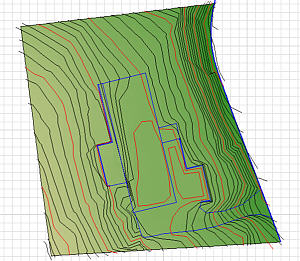
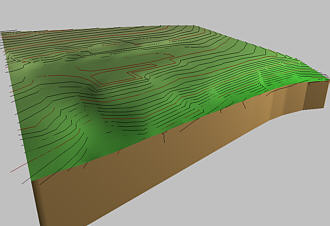
I used the command Edit / Mesh / Conform Mesh to Topography Group to contour the Terrain Mesh to the surveyed data:
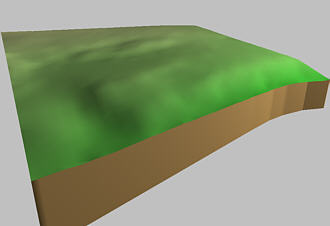
With the Contour Lines disabled, the Mesh looks exactly like my yard:
Test files
| File name | Comments |
| LoopTest.zip | A long loop with 48" radius curves and a textured SD-40 (471Kb) |
| 2LoopTest.zip | As above, dual mainline, 5 cars in each train. (700Kb) |
Libraries
All files are ZIP files. Unzip the files to an appropriate folder (e.g., Rolling Stock) within your Standard Library. If you're loading Von's Library, create a new folder named Von's library at the same level as "Rolling Stock" and "Track", then extract the files within it, preserving their folder structure.
| File name | Comments |
| DB InterCity | AG 120 Locomotive and all six passenger cars. Very realistic. (5.2Mb) |
| European textured | Class 610 DMU pair and a Taurus Dispolok. Very well done. (2.8Mb) |
| Old Pullman O Scale | Zip file includes Code 100, Code 125 and Code 148 (14Kb) |
| Atlas O Scale | Zip file for the new Atlas 21th Century rail () |